Flowchart ( รูปแบบการเขียนผังงาน )
(Sequence) | (Decision or Selection) | (Repeation or Loop) |
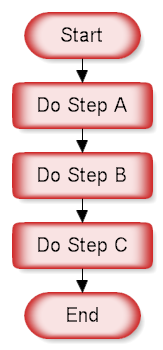
Sequence
The flowchart above demonstrates a sequence of steps. The reader would start at the Start shape and follow the arrows from one rectangle to the other, finishing at the End shape. A sequence is the simplest flowcharting construction. You do each step in order.
Loop
This structure allows you to repeat a task over and over. The red chart above on the left does the task and repeats doing the task until the condition is true. The green chart on the right checks the condition first and does the task while the condition is true. It is not important that you remember whether the loop is a "Do While" or "Repeat Until" loop, only that you can check the condition at the start of the loop or at the end. You can also have the conditions reversed and your loop is still a structured design loop. A slight variation of the above is the "For each...do the following" loop shown below.
 |
Decision
This structure is called a decision, "If Then.. Else" or a conditional. A question is asked in the decision shape. Depending on the answer the control follows either of two paths. In the chart above, if the temperature is going to be less than freezing (32 degrees Fahrenheit) the tomatoes should be covered. Most RFFlow stencils include the words "Yes" and "No" so you can just drag them onto your chart. "True" and "False" are also included in most of the flowcharting stencils.
อ้างอิง http://www.rff.com/structured_flowchart.htm https://www-927.ibm.com/ibm/cas/hspc/student/tutorials/flowcharts.html |

No comments:
Post a Comment